
An invoice aging report sorts your unpaid invoices by how long they've been outstanding, usually in 30-day buckets, so you can see exactly which balances need attention now. Its core job is simple: prioritize collections and protect your cash flow before slow-paying customers become bad debt. You can build one in your accounting software or a spreadsheet, and either way, the report only works if the underlying data is clean.
TL;DR:
- Most companies use four to five aging buckets, with standard thresholds at 0-30, 31-60, 61-90, and 90 plus days, and longer terms may customize these.
- Accurate aging reports depend on clean data, including correct payment terms, timely reconciliation, and adjustment for credit memos and unapplied cash.
- Prioritizing collections based on invoice size and likelihood of recovery is more effective than relying solely on age, with large overdue balances at 61-90 days being high-risk targets.
- Running aging reports weekly or biweekly helps detect slow payment trends early, whereas monthly reports mainly serve financial statement accuracy.
- Integrating invoicing, payments, and reminders into one system like Gravun streamlines collections, automates follow-ups, and improves overall receivables management.
Table of Contents
- What an Invoice Aging Report Includes
- Aging Buckets and a Worked Allowance Example
- How to Generate an Aging Report Step by Step
- Turning Aging Data Into a Collections Priority List
- Data Problems That Quietly Break Aging Reports
- How Often to Run the Report and What to Track
- How Gravun Operationalizes Your Aging Data
- Three Rules I Use When Reviewing an Aging Report
- Consolidate Your Invoicing and Collections in One Place
- Sources
- FAQ
What an Invoice Aging Report Includes
An accounts receivable aging report can be run at the customer level, showing a total owed and its bucket breakdown, or at the invoice level, showing every open bill individually. Most collections work happens at the invoice level, since two invoices from the same customer can sit in completely different buckets.
A standard aging accounts receivable report includes:
- Invoice number and invoice date
- Due date, based on the customer's payment terms
- Days past due, calculated from the due date to the report date
- Bucket placement (current, 31 to 60, and so on)
- Outstanding balance and a running bucket total
Aging always depends on two moving parts: payment terms and the report date. A Net 60 invoice sitting at 45 days looks alarming until you check terms and realize it isn't due yet. Credit memos and unapplied payments matter too. Leave them out, and your aging accounts receivable totals will overstate what customers actually owe.
Aging Buckets and a Worked Allowance Example
Most companies use four to five buckets: current (0 to 30 days), 31 to 60, 61 to 90, and 90-plus. Some businesses running longer payment terms customize these into 60-day increments, but the standard 30-day structure is what most accounting software defaults to, and what most lenders and auditors expect to see.
Here's a sample aging schedule for a company with $150,000 in total receivables:
Pro Tip: A common illustrative approach applies rising risk percentages by bucket, such as 1% for current balances, 5% for 31 to 60 days, and 15% for anything past 61 days, then sums the results to estimate an allowance for doubtful accounts. Using the table above, that would land around $900 (current) plus $1,800 (31 to 60) plus $3,600 (61-plus), for roughly $6,300 total. Treat these percentages as a starting framework, not a fixed rule. Your own default rate history should adjust them over time.
How to Generate an Aging Report Step by Step
Building an accurate invoice aging analysis is mostly a data problem before it's a math problem. Get the inputs wrong and the report lies to you convincingly.
- Pull your source data. Export the open AR subledger from your accounting platform, then cross-check it against the general ledger control account, your payment processor's settled transactions, and any unapplied cash sitting in suspense.
- Confirm your report date. Every days-past-due calculation depends on it. Running the report on the last calendar day versus the last business day can shift invoices between buckets.
- Set your calculation. In a spreadsheet, days past due equals report date minus due date. In most ERPs and accounting platforms, this is a configurable report parameter rather than a manual formula, so check the aging settings before exporting anything.
- Choose summary or detail view. Summary shows customer totals by bucket; detail shows every invoice line. Collections work needs detail; board reporting usually only needs summary.
- Set sort order. Sorting by outstanding balance within each bucket, rather than alphabetically by customer, surfaces your highest-dollar risks first, which is how Oracle's payables documentation frames report configuration for exactly this reason.
- Run the export and verify it. Before anyone acts on the numbers, check accuracy with a five-point review: does the grand total match your AR control account in the general ledger, are unapplied payments reflected, do a handful of sampled invoices match their actual due dates, are voided or duplicate invoices excluded, and does the report date match what you intended.
Skipping that last step is the single most common way finance teams end up chasing customers who already paid. Reconciling against your bank feed and payment processor before distributing the report catches most of these errors early.
Turning Aging Data Into a Collections Priority List
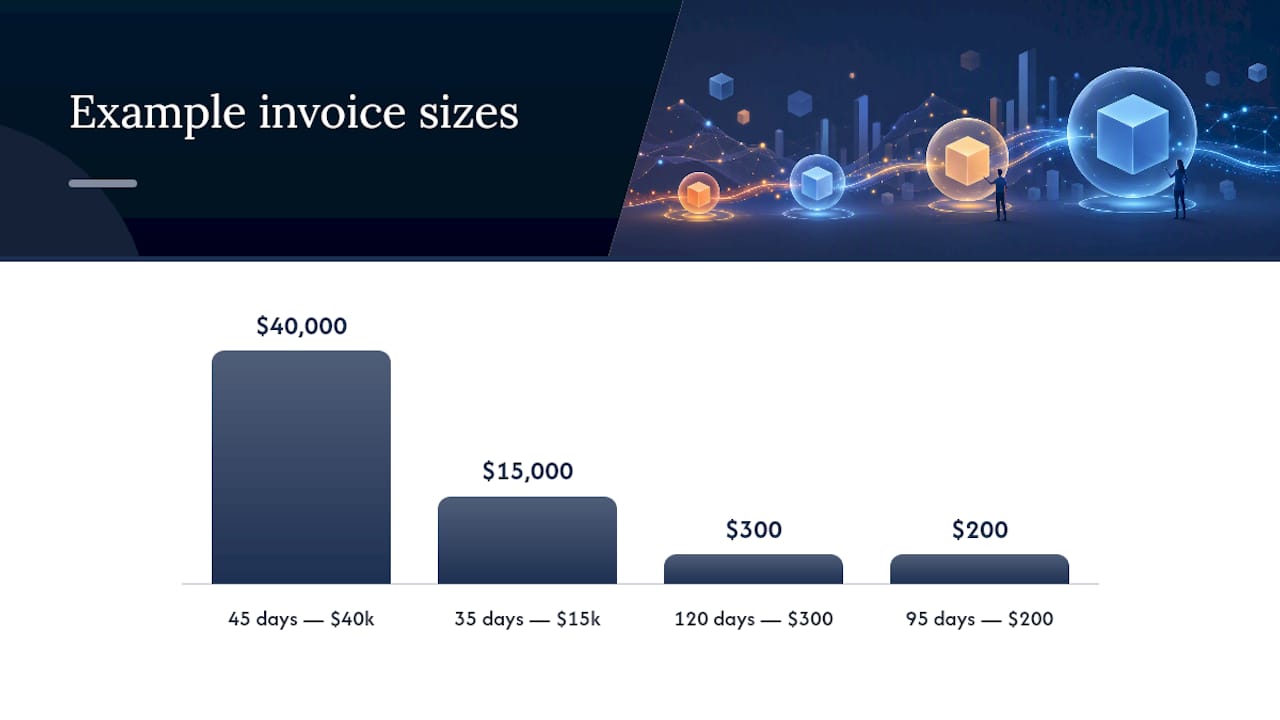
A completed report only creates value once someone acts on it, and the biggest mistake finance teams make is treating age as the only signal. A $200 invoice at 95 days and a $40,000 invoice at 45 days are not equally urgent. Prioritize by expected recovery, meaning balance size weighted against how likely you are to actually collect it, not by which invoice has been open longest.
That reshapes how you structure a collections workflow by bucket:
- Current to 30 days: Automated reminder emails only. No human time needed yet.
- 31 to 60 days: Personal outreach begins here, especially on large balances. This is where a collector's time delivers the highest return, since the customer is still likely to pay with a nudge.
- 61 to 90 days: Phone calls, not just email. Offer a payment plan if the relationship is worth preserving.
- 90-plus days: Escalate to a manager, consider a formal demand letter, and evaluate whether the account moves to a collections agency or gets written off.
Aging data also feeds your Days Sales Outstanding calculation and cash-flow forecasting, since a receivables book skewing toward older buckets predicts tighter cash weeks ahead even before the bank balance shows it.
Pro Tip: Don't let a handful of small, aged balances eat your collector's morning. A $300 invoice sitting at 120 days is often not worth a phone call. A $15,000 invoice at 35 days almost always is. Sort your worklist by dollars at risk, not days outstanding, and your team's time will go where it actually moves the needle.
Data Problems That Quietly Break Aging Reports
Bad inputs produce a report that looks authoritative and misleads everyone who reads it. The usual culprits are unapplied payments sitting unmatched to invoices, credit memos never applied against the balance they're meant to offset, incorrect due dates from a wrong terms code, and duplicate invoices created during a system migration or a manual re-entry.
Catch these before they cause an awkward collections call to a customer who already paid:
- Sample a handful of large invoices and a handful of small ones across different buckets, then confirm payment status against your bank feed.
- Reconcile unapplied cash weekly, not just at month-end, so it doesn't pile up unnoticed.
- Check due dates against the actual signed terms, not the system default, for any customer with custom payment arrangements.
- Void or reissue duplicate invoices immediately rather than leaving them open "to deal with later."
Most of this is a 20-minute weekly habit once you build it into your process, and it's far cheaper than the customer goodwill lost when your team chases a paid invoice.
How Often to Run the Report and What to Track
A monthly aging accounts receivable run is the bare minimum, mostly useful for financial statement close and bad-debt reserve calculations. Active collections work needs more frequency. Running the report weekly or biweekly catches slow drift in a customer's payment behavior before it becomes a 90-day problem, and it keeps DSO trending in the right direction rather than discovering a spike a month after it started.
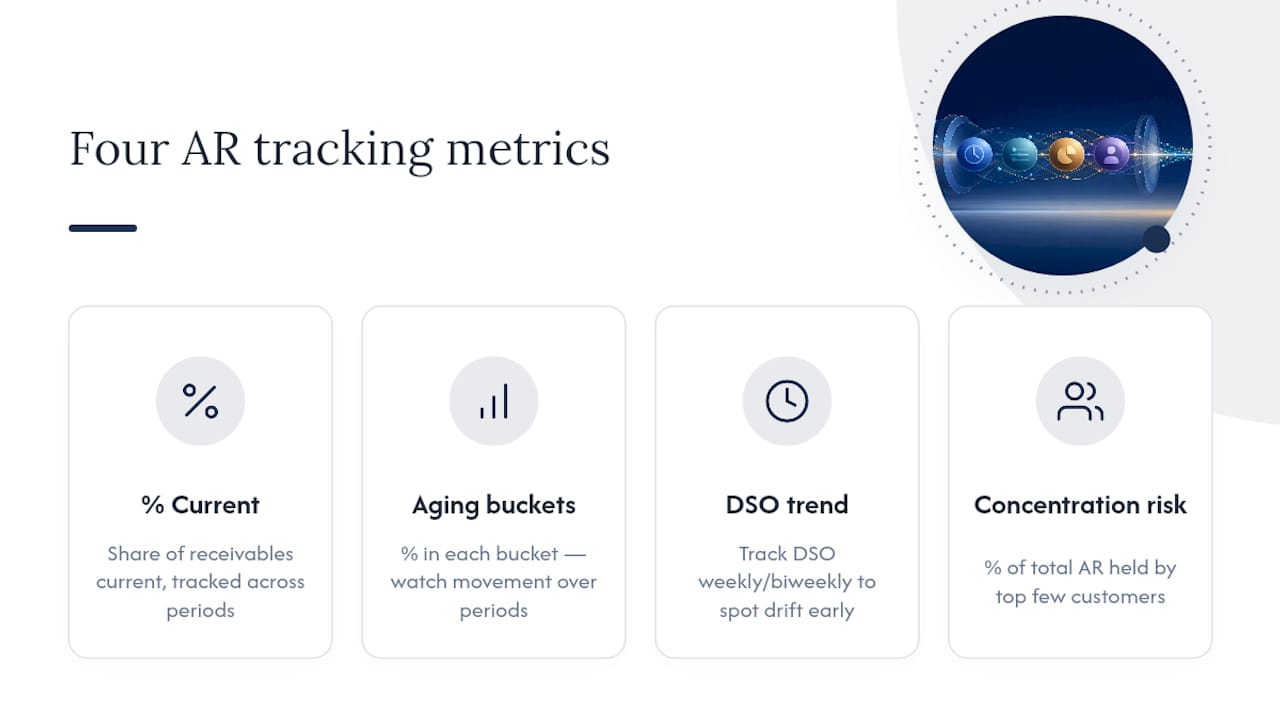
Track four numbers consistently: percentage of receivables current, percentage in each aging bucket, DSO trend, and concentration risk, meaning how much of your total AR sits with your top few customers. Watch bucket percentages move over consecutive report periods rather than judging a single snapshot in isolation.
How Gravun Operationalizes Your Aging Data
Running an accurate aging report is only half the job. Acting on it fast is the other half, and that's usually where disconnected tools slow teams down. Gravun keeps invoicing, payments, and customer contact history in one workspace, so an aging balance is never disconnected from the job record, the payment history, or the last message sent to that customer.
Automated payment reminders trigger based on invoice age, so your 31 to 60 day bucket gets consistent, hands-off follow-up without a collector manually tracking due dates. Payment capture happens in the same system that generated the invoice, which means reconciliation against a separate processor export largely disappears. Gravun's connected workspace pulls reporting from the same live records your team already works from, cutting the lag between spotting a stalled invoice and acting on it. (Case studies and usage data on collection speed improvements are available on request.)
Three Rules I Use When Reviewing an Aging Report
Sample the large balances first, not the oldest ones. Automate every reminder you can for small, current balances so human attention stays reserved for judgment calls. And when a customer shows up chronically late across multiple periods, that's a credit terms conversation, not another collections email.
The report itself is not the deliverable. The prioritized worklist it produces is. If your review process is scrolling the same spreadsheet every week without a clear "who gets contacted today" answer at the end, the report isn't doing its job yet.
— Executive
Consolidate Your Invoicing and Collections in One Place
Gravun replaces the disconnected mix of invoicing software, reminder tools, and spreadsheets that most service businesses stitch together to manage receivables, with one workspace built around live customer and job records. Instead of exporting an aging report from one system and chasing payments through another, your invoicing, payment capture, and automated reminders run from the same place.
Plans start with Starter at $25 per month per seat, scaling up to Professional and Scale tiers as your collections workflow grows more complex. Larger teams needing custom onboarding and security review can reach out through Gravun Enterprise. If your team is still reconciling three tools every time an invoice ages into a new bucket, check current pricing and see which plan fits your receivables volume.
Sources
- What is accounts receivable aging? | AccountingTools
- Aging: Definition in Accounting, Uses, Report Example | Investopedia
- What is an aging report? | Stripe Resources
FAQ
What Is an Aging Report?
An aging report sorts unpaid invoices or bills by how long they've been outstanding, typically in 30-day buckets, so you can quickly see which receivables carry the most collections risk.
How Do You Create an Aging Report?
Pull your open invoices from your accounting system or subledger, calculate days past due for each invoice against the report date, then group the totals into buckets like current, 31 to 60, 61 to 90, and 90-plus days. Most accounting platforms, and a connected system like Gravun, generate this automatically once invoice and payment data are current.
Can You Give an Example of an Aging Report?
A basic example lists a customer's invoices with columns for invoice number, due date, days past due, and balance, then totals those balances into buckets, such as $90,000 current, $36,000 at 31 to 60 days, and so on, as shown in the sample schedule above.
What Are the Two Types of Aging Reports?
The two most common formats are the summary aging report, which shows total balances per customer by bucket, and the detail aging report, which lists every individual open invoice with its own due date and bucket placement.
How Often Should You Run an Invoice Aging Report?
Run it at least monthly for financial close and bad-debt reserve purposes, but weekly or biweekly if your team is actively working collections, since more frequent reviews catch slow-paying trends before they become 90-day problems.